
You can not select more than 25 topics
Topics must start with a letter or number, can include dashes ('-') and can be up to 35 characters long.
44 lines
974 B
44 lines
974 B
# fringe-current-line |
|
|
|
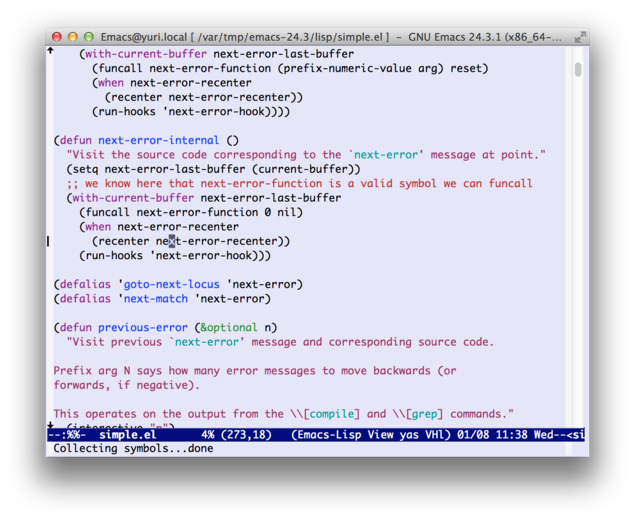
Show current line on the fringe. |
|
|
|
 |
|
|
|
## Description |
|
|
|
fringe-current-line is a package to indicate current line on the fringe. |
|
You can use by the following steps. |
|
|
|
1. Place this file on your load-path. |
|
|
|
2. Add the following code into your init file: |
|
|
|
```lisp |
|
(require 'fringe-current-line) |
|
``` |
|
|
|
3. Activate the mode. |
|
|
|
* To enable it only in certain buffer, run `M-x fringe-current-line-mode`. |
|
Run again and you can disable it. |
|
|
|
* To enable it globally, add the following into your init file: |
|
|
|
```lisp |
|
(global-fringe-current-line-mode 1) |
|
``` |
|
|
|
You can toggle it by running `M-x global-fringe-current-line-mode`. |
|
|
|
|
|
## Limitation |
|
|
|
The indicator is not shown if the cursor is at the end of the buffer and the last line is empty. |
|
|
|
|
|
## License |
|
|
|
Copyright (C) 2014 Kouhei Yanagita |
|
|
|
This program is free software; you can redistribute it and/or modify |
|
it under the terms of the MIT License.
|
|
|