
You can not select more than 25 topics
Topics must start with a letter or number, can include dashes ('-') and can be up to 35 characters long.
437 lines
14 KiB
437 lines
14 KiB
# Hydra |
|
|
|
[](https://travis-ci.org/abo-abo/hydra) |
|
[](https://melpa.org/#/hydra) |
|
[](https://stable.melpa.org/#/hydra) |
|
|
|
This is a package for GNU Emacs that can be used to tie related commands into a family of short |
|
bindings with a common prefix - a Hydra. |
|
|
|
 |
|
|
|
## Description for Poets |
|
|
|
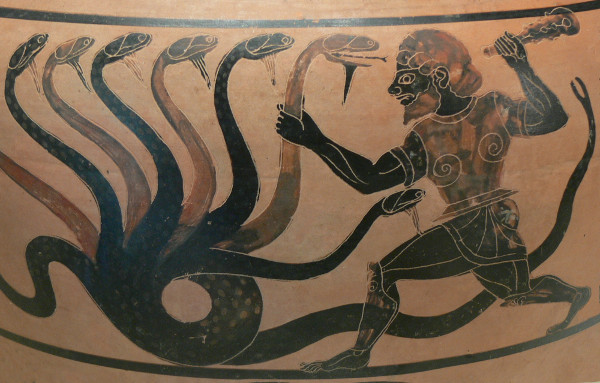
Once you summon the Hydra through the prefixed binding (the body + any one head), all heads can be |
|
called in succession with only a short extension. |
|
|
|
The Hydra is vanquished once Hercules, any binding that isn't the Hydra's head, arrives. Note that |
|
Hercules, besides vanquishing the Hydra, will still serve his original purpose, calling his proper |
|
command. This makes the Hydra very seamless, it's like a minor mode that disables itself |
|
auto-magically. |
|
|
|
## Description for Pragmatics |
|
|
|
Imagine that you have bound <kbd>C-c j</kbd> and <kbd>C-c k</kbd> in your |
|
config. You want to call <kbd>C-c j</kbd> and <kbd>C-c k</kbd> in some |
|
(arbitrary) sequence. Hydra allows you to: |
|
|
|
- Bind your functions in a way that pressing <kbd>C-c jjkk3j5k</kbd> is |
|
equivalent to pressing <kbd>C-c j C-c j C-c k C-c k M-3 C-c j M-5 C-c |
|
k</kbd>. Any key other than <kbd>j</kbd> or <kbd>k</kbd> exits this state. |
|
|
|
- Assign a custom hint to this group of functions, so that you know immediately |
|
after pressing <kbd>C-c</kbd> that you can follow up with <kbd>j</kbd> or |
|
<kbd>k</kbd>. |
|
|
|
If you want to quickly understand the concept, see [the video demo](https://www.youtube.com/watch?v=_qZliI1BKzI). |
|
|
|
<!-- markdown-toc start - Don't edit this section. Run M-x markdown-toc/generate-toc again --> |
|
**Table of Contents** |
|
|
|
- [Sample Hydras](#sample-hydras) |
|
- [The one with the least amount of code](#the-one-with-the-least-amount-of-code) |
|
- [The impressive-looking one](#the-impressive-looking-one) |
|
- [Community wiki](#community-wiki) |
|
- [The Rules of Hydra-tics](#the-rules-of-hydra-tics) |
|
- [`hydra-awesome`](#hydra-awesome) |
|
- [`awesome-map` and `awesome-binding`](#awesome-map-and-awesome-binding) |
|
- [`awesome-plist`](#awesome-plist) |
|
- [`:pre` and `:post`](#pre-and-post) |
|
- [`:exit`](#exit) |
|
- [`:foreign-keys`](#foreign-keys) |
|
- [`:color`](#color) |
|
- [`:timeout`](#timeout) |
|
- [`:hint`](#hint) |
|
- [`:bind`](#bind) |
|
- [`awesome-docstring`](#awesome-docstring) |
|
- [`awesome-head-1`](#awesome-head-1) |
|
- [`head-binding`](#head-binding) |
|
- [`head-command`](#head-command) |
|
- [`head-hint`](#head-hint) |
|
- [`head-plist`](#head-plist) |
|
|
|
<!-- markdown-toc end --> |
|
|
|
# Sample Hydras |
|
|
|
## The one with the least amount of code |
|
|
|
```elisp |
|
(defhydra hydra-zoom (global-map "<f2>") |
|
"zoom" |
|
("g" text-scale-increase "in") |
|
("l" text-scale-decrease "out")) |
|
``` |
|
|
|
With this simple code, you can: |
|
|
|
- Start zooming in with <kbd><f2> g</kbd>. |
|
- Continue to zoom in with <kbd>g</kbd>. |
|
- Or zoom out with <kbd>l</kbd>. |
|
- Zoom in five times at once with <kbd>5g</kbd>. |
|
- Stop zooming with *any* key that isn't <kbd>g</kbd> or <kbd>l</kbd>. |
|
|
|
For any Hydra: |
|
|
|
- `digit-argument` can be called with <kbd>0</kbd>-<kbd>9</kbd>. |
|
- `negative-argument` can be called with <kbd>-</kbd>. |
|
- `universal-argument` can be called with <kbd>C-u</kbd>. |
|
|
|
## The impressive-looking one |
|
|
|
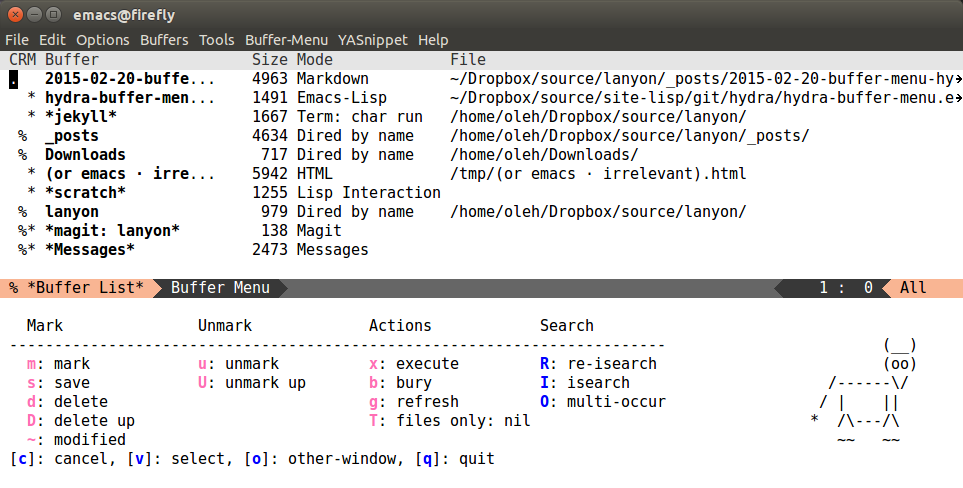
Here's the result of pressing <kbd>.</kbd> in the good-old Buffer menu: |
|
|
|
 |
|
|
|
The code is large but very simple: |
|
|
|
```elisp |
|
(defhydra hydra-buffer-menu (:color pink |
|
:hint nil) |
|
" |
|
^Mark^ ^Unmark^ ^Actions^ ^Search |
|
^^^^^^^^----------------------------------------------------------------- |
|
_m_: mark _u_: unmark _x_: execute _R_: re-isearch |
|
_s_: save _U_: unmark up _b_: bury _I_: isearch |
|
_d_: delete ^ ^ _g_: refresh _O_: multi-occur |
|
_D_: delete up ^ ^ _T_: files only: % -28`Buffer-menu-files-only |
|
_~_: modified |
|
" |
|
("m" Buffer-menu-mark) |
|
("u" Buffer-menu-unmark) |
|
("U" Buffer-menu-backup-unmark) |
|
("d" Buffer-menu-delete) |
|
("D" Buffer-menu-delete-backwards) |
|
("s" Buffer-menu-save) |
|
("~" Buffer-menu-not-modified) |
|
("x" Buffer-menu-execute) |
|
("b" Buffer-menu-bury) |
|
("g" revert-buffer) |
|
("T" Buffer-menu-toggle-files-only) |
|
("O" Buffer-menu-multi-occur :color blue) |
|
("I" Buffer-menu-isearch-buffers :color blue) |
|
("R" Buffer-menu-isearch-buffers-regexp :color blue) |
|
("c" nil "cancel") |
|
("v" Buffer-menu-select "select" :color blue) |
|
("o" Buffer-menu-other-window "other-window" :color blue) |
|
("q" quit-window "quit" :color blue)) |
|
|
|
(define-key Buffer-menu-mode-map "." 'hydra-buffer-menu/body) |
|
``` |
|
|
|
Looking at the code, you can see `hydra-buffer-menu` as sort of a namespace construct that wraps |
|
each function that it's given in code that shows that hint and makes it easy to call the related |
|
functions. One additional function is created and returned as the result of `defhydra` - |
|
`hydra-buffer-menu/body`. This function does nothing except setting up the hint and the keymap, and |
|
is usually the entry point to complex hydras. |
|
|
|
To write your own hydras, you can: |
|
|
|
- Either modify an existing hydra to do what you want to do. |
|
- Or read [the rules](#the-rules-of-hydra-tics), |
|
[the examples](https://github.com/abo-abo/hydra/blob/master/hydra-examples.el), |
|
the docstrings and comments in the source. |
|
|
|
# Community wiki |
|
|
|
You can find some user created hydras and more documentation in the project's |
|
[community wiki](https://github.com/abo-abo/hydra/wiki/). Feel free to add your |
|
own or edit the existing ones. |
|
|
|
# The Rules of Hydra-tics |
|
|
|
Each hydra (take `awesome` as a prefix to make it more specific) looks like this: |
|
|
|
``` |
|
(defhydra hydra-awesome (awesome-map awesome-binding awesome-plist) |
|
awesome-docstring |
|
awesome-head-1 |
|
awesome-head-2 |
|
awesome-head-3 |
|
...) |
|
``` |
|
|
|
## `hydra-awesome` |
|
|
|
Each hydra needs a name, and this one is named `hydra-awesome`. You can name your hydras as you wish, |
|
but I prefer to start each one with `hydra-`, because it acts as an additional namespace layer, for example: |
|
`hydra-zoom`, `hydra-helm`, `hydra-apropos` etc. |
|
|
|
If you name your hydra `hydra-awesome`, the return result of `defhydra` will be `hydra-awesome/body`. |
|
|
|
Here's what `hydra-zoom/body` looks like, if you're interested: |
|
|
|
```elisp |
|
(defun hydra-zoom/body () |
|
"Call the body in the \"hydra-zoom\" hydra. |
|
|
|
The heads for the associated hydra are: |
|
|
|
\"g\": `text-scale-increase', |
|
\"l\": `text-scale-decrease' |
|
|
|
The body can be accessed via `hydra-zoom/body', which is bound to \"<f2>\"." |
|
(interactive) |
|
(require 'hydra) |
|
(hydra-default-pre) |
|
(let ((hydra--ignore nil)) |
|
(hydra-keyboard-quit) |
|
(setq hydra-curr-body-fn |
|
'hydra-zoom/body)) |
|
(hydra-show-hint |
|
hydra-zoom/hint |
|
'hydra-zoom) |
|
(hydra-set-transient-map |
|
hydra-zoom/keymap |
|
(lambda nil |
|
(hydra-keyboard-quit) |
|
nil) |
|
nil) |
|
(setq prefix-arg |
|
current-prefix-arg)) |
|
``` |
|
|
|
## `awesome-map` and `awesome-binding` |
|
|
|
This can be any keymap, for instance, `global-map` or `isearch-mode-map`. |
|
|
|
For this example: |
|
|
|
```elisp |
|
(defhydra hydra-zoom (global-map "<f2>") |
|
"zoom" |
|
("g" text-scale-increase "in") |
|
("l" text-scale-decrease "out")) |
|
``` |
|
|
|
- `awesome-map` is `global-map` |
|
- `awesome-binding` is `"<f2>"` |
|
|
|
And here's the relevant generated code: |
|
|
|
```elisp |
|
(unless (keymapp (lookup-key global-map (kbd "<f2>"))) |
|
(define-key global-map (kbd "<f2>") nil)) |
|
(define-key global-map [f2 103] |
|
(function hydra-zoom/text-scale-increase)) |
|
(define-key global-map [f2 108] |
|
(function hydra-zoom/text-scale-decrease)) |
|
``` |
|
|
|
As you see, `"<f2>"` is used as a prefix for <kbd>g</kbd> (char value 103) and <kbd>l</kbd> |
|
(char value 108). |
|
|
|
If you don't want to use a map right now, you can skip it like this: |
|
|
|
```elisp |
|
(defhydra hydra-zoom (nil nil) |
|
"zoom" |
|
("g" text-scale-increase "in") |
|
("l" text-scale-decrease "out")) |
|
``` |
|
|
|
Or even simpler: |
|
|
|
```elisp |
|
(defhydra hydra-zoom () |
|
"zoom" |
|
("g" text-scale-increase "in") |
|
("l" text-scale-decrease "out")) |
|
``` |
|
|
|
But then you would have to bind `hydra-zoom/text-scale-increase` and |
|
`hydra-zoom/text-scale-decrease` yourself. |
|
|
|
## `awesome-plist` |
|
|
|
You can read up on what a plist is in |
|
[the Elisp manual](https://www.gnu.org/software/emacs/manual/html_node/elisp/Property-Lists.html). |
|
|
|
You can use `awesome-plist` to modify the behavior of each head in some way. |
|
Below is a list of each key. |
|
|
|
### `:pre` and `:post` |
|
|
|
You can specify code that will be called before each head, and after the body. For example: |
|
|
|
```elisp |
|
(defhydra hydra-vi (:pre (set-cursor-color "#40e0d0") |
|
:post (progn |
|
(set-cursor-color "#ffffff") |
|
(message |
|
"Thank you, come again."))) |
|
"vi" |
|
("l" forward-char) |
|
("h" backward-char) |
|
("j" next-line) |
|
("k" previous-line) |
|
("q" nil "quit")) |
|
``` |
|
|
|
Thanks to `:pre`, each time any head is called, the cursor color is changed. |
|
And when the hydra quits, the cursor color will be made black again with `:post`. |
|
|
|
### `:exit` |
|
|
|
The `:exit` key is inherited by every head (they can override it) and influences what will happen |
|
after executing head's command: |
|
|
|
- `:exit nil` (the default) means that the hydra state will continue - you'll still see the hint and be able to use short bindings. |
|
- `:exit t` means that the hydra state will stop. |
|
|
|
### `:foreign-keys` |
|
|
|
The `:foreign-keys` key belongs to the body and decides what to do when a key is pressed that doesn't |
|
belong to any head: |
|
|
|
- `:foreign-keys nil` (the default) means that the hydra state will stop and the foreign key will |
|
do whatever it was supposed to do if there was no hydra state. |
|
- `:foreign-keys warn` will not stop the hydra state, but instead will issue a warning without |
|
running the foreign key. |
|
- `:foreign-keys run` will not stop the hydra state, and try to run the foreign key. |
|
|
|
### `:color` |
|
|
|
The `:color` key is a shortcut. It aggregates `:exit` and `:foreign-keys` key in the following way: |
|
|
|
| color | toggle | |
|
|----------+----------------------------| |
|
| red | | |
|
| blue | :exit t | |
|
| amaranth | :foreign-keys warn | |
|
| teal | :foreign-keys warn :exit t | |
|
| pink | :foreign-keys run | |
|
|
|
It's also a trick to make you instantly aware of the current hydra keys that you're about to press: |
|
the keys will be highlighted with the appropriate color. |
|
|
|
### `:timeout` |
|
|
|
The `:timeout` key starts a timer for the corresponding amount of seconds that disables the hydra. |
|
Calling any head will refresh the timer. |
|
|
|
### `:hint` |
|
|
|
The `:hint` key will be inherited by each head. Each head is allowed to override it, of course. |
|
One value that makes sense is `:hint nil`. See below for an explanation of head hint. |
|
|
|
### `:bind` |
|
|
|
The `:bind` key provides a lambda to be used to bind each head. This is quite advanced and rarely |
|
used, you're not likely to need it. But if you would like to bind your heads with e.g. `bind-key` |
|
instead of `define-key` you can use this option. |
|
|
|
The `:bind` key can be overridden by each head. This is useful if you want to have a few heads that |
|
are not bound outside the hydra. |
|
|
|
### `:base-map` |
|
Use this option if you want to override `hydra-base-map` for the current hydra. |
|
|
|
## `awesome-docstring` |
|
|
|
This can be a simple string used to build the final hydra hint. However, if you start it with a |
|
newline, the key-highlighting and Ruby-style string interpolation becomes enabled, as you can see in |
|
`hydra-buffer-menu` above. |
|
|
|
To highlight a key, just wrap it in underscores. Note that the key must belong to one of the heads. |
|
The key will be highlighted with the color that is appropriate to the behavior of the key, i.e. if |
|
the key will make the hydra exit, the color will be blue. |
|
|
|
To insert an empty character, use `^`. The only use of this is to have your code aligned as |
|
nicely as the result. |
|
|
|
To insert a dynamic Elisp variable, use `%`` followed by the variable. Each time the variable |
|
changes due to a head, the docstring will be updated. `format`-style width specifiers can be used. |
|
|
|
To insert a dynamic Elisp expression, use e.g. `%(length (dired-get-marked-files))`. If a head will |
|
change the amount of marked files, for example, it will be appropriately updated. |
|
|
|
If the result of the Elisp expression is a string and you don't want to quote it, use this form: |
|
`%s(shell-command-to-string "du -hs")`. |
|
|
|
## `awesome-head-1` |
|
|
|
Each head looks like this: |
|
|
|
```elisp |
|
(head-binding head-command head-hint head-plist) |
|
``` |
|
|
|
For the head `("g" text-scale-increase "in")`: |
|
|
|
- `head-binding` is `"g"`. |
|
- `head-command` is `text-scale-increase`. |
|
- `head-hint` is `"in"`. |
|
- `head-plist` is `nil`. |
|
|
|
### `head-binding` |
|
|
|
The `head-binding` is a string that can be passed to `kbd`. |
|
|
|
### `head-command` |
|
|
|
The `head-command` can be: |
|
|
|
- command name, like `text-scale-increase`. |
|
- a lambda, like |
|
|
|
("g" (lambda () |
|
(interactive) |
|
(let ((current-prefix-arg 4)) |
|
(call-interactively #'magit-status))) |
|
"git") |
|
|
|
- nil, which exits the hydra. |
|
- a single sexp, which will be wrapped in an interactive lambda. |
|
|
|
Here's an example of the last option: |
|
|
|
```elisp |
|
(defhydra hydra-launcher (:color blue) |
|
"Launch" |
|
("h" man "man") |
|
("r" (browse-url "http://www.reddit.com/r/emacs/") "reddit") |
|
("w" (browse-url "http://www.emacswiki.org/") "emacswiki") |
|
("s" shell "shell") |
|
("q" nil "cancel")) |
|
(global-set-key (kbd "C-c r") 'hydra-launcher/body) |
|
``` |
|
|
|
### `head-hint` |
|
|
|
In case of a large body docstring, you usually don't want the head hint to show up, since |
|
you've already documented it in the body docstring. |
|
You can set the head hint to `nil` to do this. |
|
|
|
Example: |
|
|
|
```elisp |
|
(defhydra hydra-zoom (global-map "<f2>") |
|
" |
|
Press _g_ to zoom in. |
|
" |
|
("g" text-scale-increase nil) |
|
("l" text-scale-decrease "out")) |
|
``` |
|
|
|
### `head-plist` |
|
|
|
Here's a list of body keys that can be overridden in each head: |
|
|
|
- `:exit` |
|
- `:color` |
|
- `:bind` |
|
- `:column` |
|
|
|
Use `:column` feature to have an aligned rectangular docstring without defining it manually. |
|
See [hydra-examples.el](https://github.com/abo-abo/hydra/blob/05871dd6c8af7b2268bd1a10eb9f8a3e423209cd/hydra-examples.el#L337) for an example code.
|
|
|