
4.9 KiB
ace-window
GNU Emacs package for selecting a window to switch to
What and why
I'm sure you're aware of the other-window command. While it's great
for two windows, it quickly loses its value when there are more windows.
You need to call it many times, and since it's not easily predictable,
you have to check each time if you're in the window that you wanted.
Another approach is to use windmove-left, windmove-up, etc. These
are fast and predictable. Their disadvantage is that they need 4 key
bindings. The default ones are shift+arrows, which are hard to reach.
This package aims to take the speed and predictability of windmove
and pack it into a single key binding, similar to other-window.
Setup
Just assign ace-window to a short key binding, as switching windows
is a common task. I suggest M-p, as it's short and not
bound in the default Emacs.
Usage
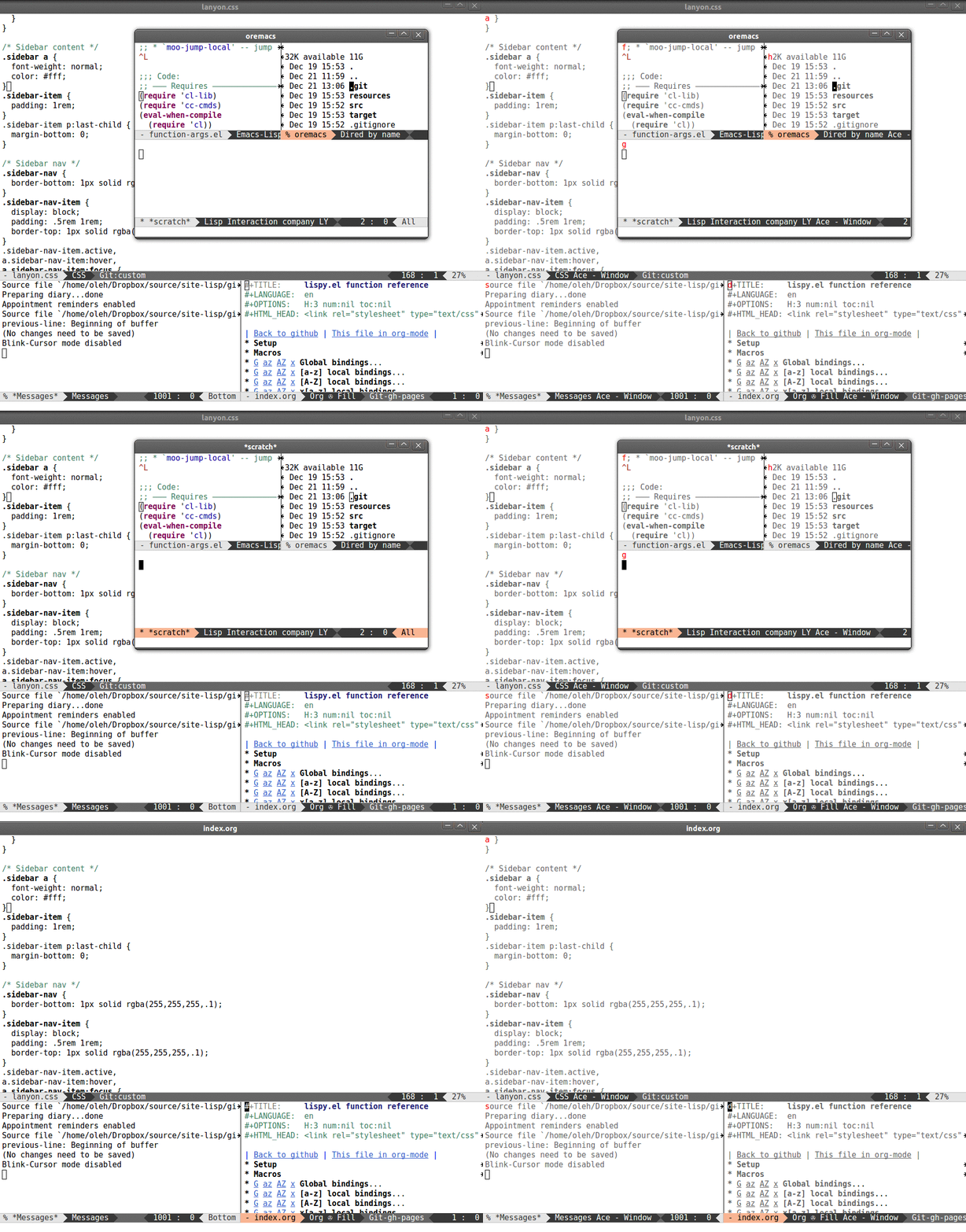
When there are two windows, ace-window will call other-window. If
there are more, each window will have the first character of its window
identifier highlighted at the upper left of the window. Pressing that
character will either switch to that window or filter to the next
character needed to select a specific window. Note that, unlike
ace-jump-mode, the position of point will not be changed, i.e. the
same behavior as that of other-window.
The windows are ordered top-down, left-to-right. This means that if you
remember your window layouts, you can switch windows without even
looking at the leading char. For instance, the top left window will
always be 1 (or a if you use letters for window characters).
ace-window works across multiple frames, as you can see from the
in-action gif.
Swap and delete window
-
You can swap windows by calling
ace-windowwith a prefix argument C-u. -
You can delete the selected window by calling
ace-windowwith a double prefix argument, i.e. C-u C-u.
Change the action midway
You can also start by calling ace-window and then decide to switch the action to delete or swap etc. By default the bindings are:
- x - delete window
- m - swap windows
- M - move window
- j - select buffer
- n - select the previous window
- u - select buffer in the other window
- c - split window fairly, either vertically or horizontally
- v - split window vertically
- b - split window horizontally
- o - maximize current window
- ? - show these command bindings
For proper operation, these keys must not be in aw-keys. Additionally,
if you want these keys to work with fewer than three windows, you need to
have aw-dispatch-always set to t.
Customization
Aside from binding ace-window:
(global-set-key (kbd "M-p") 'ace-window)
the following customizations are available:
aw-keys
aw-keys - the list of initial characters used in window identifiers:
(setq aw-keys '(?a ?s ?d ?f ?g ?h ?j ?k ?l))
aw-keys are 0-9 by default, which is reasonable, but in the setup
above, the keys are on the home row.
aw-scope
The default one is global, which means that ace-window will work
across frames. If you set this to frame, ace-window will offer you
only the windows of the current frame.
aw-background
By default, ace-window temporarily sets a gray background and
removes color from available windows in order to make the
window-switching characters more visible. This is the behavior
inherited from ace-jump-mode.
This behavior might not be necessary, as you already know the locations where to look, i.e. the top-left corners of each window. So you can turn off the gray background with:
(setq aw-background nil)
aw-dispatch-always
When non-nil, ace-window will issue a read-char even for one window.
This will make ace-window act differently from other-window for one
or two windows. This is useful to change the action midway and execute
an action other than the default jump action.
By default, this is set to nil.
aw-dispatch-alist
This is the list of actions you can trigger from ace-window other than the
jump default. By default it is:
(defvar aw-dispatch-alist
  '((?x aw-delete-window "Delete Window")
	(?m aw-swap-window "Swap Windows")
	(?M aw-move-window "Move Window")
	(?j aw-switch-buffer-in-window "Select Buffer")
	(?n aw-flip-window)
	(?u aw-switch-buffer-other-window "Switch Buffer Other Window")
	(?c aw-split-window-fair "Split Fair Window")
	(?v aw-split-window-vert "Split Vert Window")
	(?b aw-split-window-horz "Split Horz Window")
	(?o delete-other-windows "Delete Other Windows")
	(?? aw-show-dispatch-help))
  "List of actions for `aw-dispatch-default'.")
When using ace-window, if the action character is followed by a string,
then ace-window will be invoked again to select the target window for
the action. Otherwise, the current window is selected.