
 Andreas Butti
51bc0a0cd6
Andreas Butti
51bc0a0cd6
|
7 years ago | |
|---|---|---|
| .settings | 7 years ago | |
| cmake | 7 years ago | |
| debian | 7 years ago | |
| desktop | 7 years ago | |
| development | 7 years ago | |
| mac-setup | 7 years ago | |
| po | 7 years ago | |
| readme | 7 years ago | |
| src | 7 years ago | |
| test | 7 years ago | |
| ui | 7 years ago | |
| utility/usr/local/bin | 7 years ago | |
| windows-setup | 7 years ago | |
| .autotools | 11 years ago | |
| .cproject | 7 years ago | |
| .gitignore | 7 years ago | |
| .project | 11 years ago | |
| .travis.yml | 7 years ago | |
| ABOUT-NLS | 15 years ago | |
| AUTHORS | 7 years ago | |
| CMakeLists.txt | 7 years ago | |
| Doxyfile | 7 years ago | |
| LICENSE | 11 years ago | |
| PreLoad.cmake | 7 years ago | |
| README.md | 7 years ago | |
| check-source.sh | 7 years ago | |
| test-ubuntu-ppa.sh | 7 years ago | |
| xournalpp-ubuntu-ppa.recipe | 7 years ago | |
README.md
Xournal++


Features
Xournal++ is a hand note taking software written in C++ with the target of flexibility, functionality and speed. Stroke recognizer and other parts are based on Xournal Code, which you can find at sourceforge
Xournal++ features:
- Support for Pen preassure, e.g. Wacom Tablet
- Support for annotating PDFs
- Fill shape functionality
- PDF Export (with and without paper style)
- PNG Export (with and without transparent background)
- Allow to map different tools / colors etc. to stylus buttons / mouse buttons
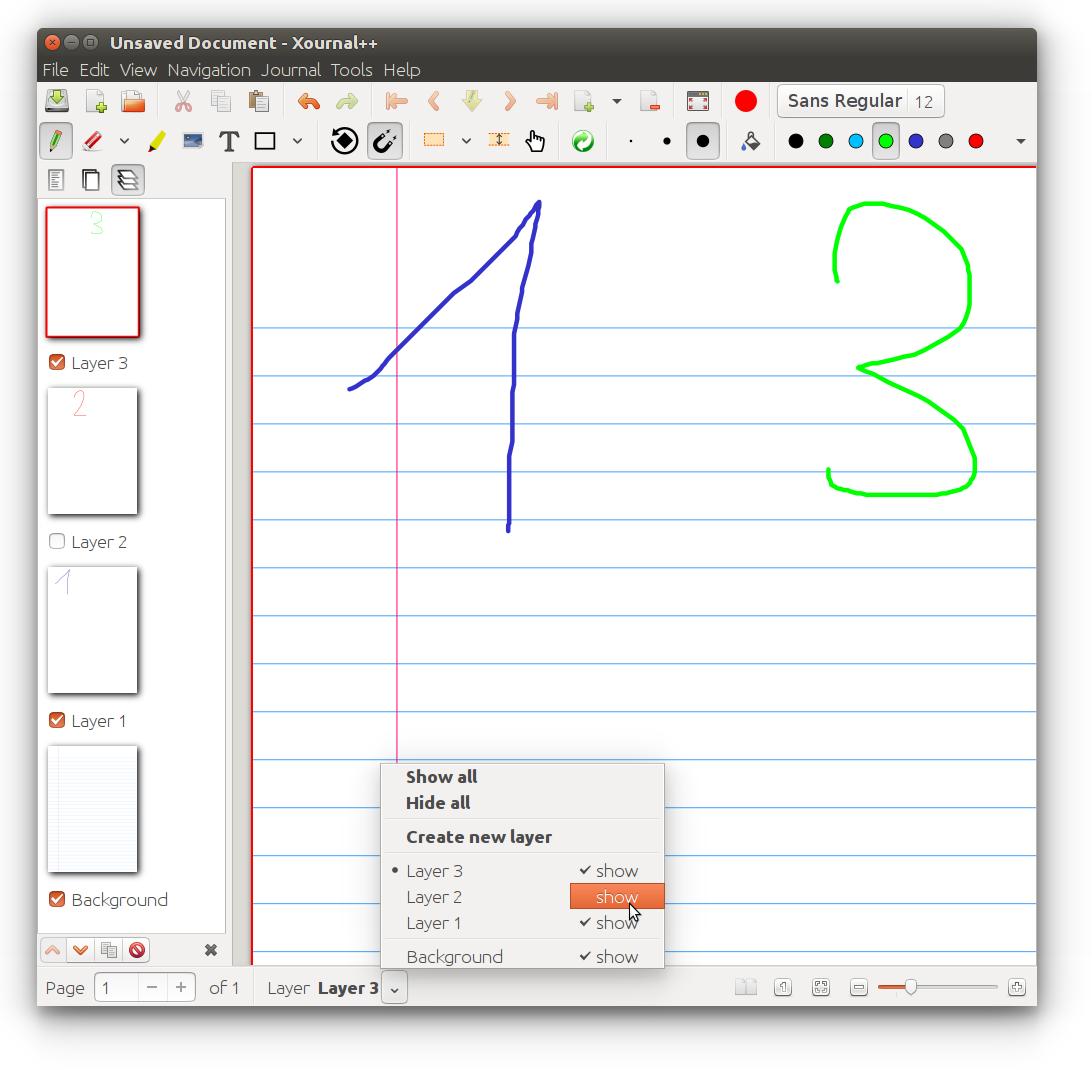
- Sidebar with Page Previews with advanced page sorting, PDF Bookmarks and Layers (can be individually hidden, editing layer can be selected)
- enhanced support for image insertion
- Eraser with multiple configurations
- Significantly reduced memory usage and code to detect memory leaks compared to Xournal
- LaTeX support (requires a working LaTeX install)
- bug reporting, autosave, and auto backup tools
- Customizeable toolbar, with multiple configurations, e.g. to optimize toolbar for portrait / landscape
- Page Template definitions
- Shape drawing (line, arrow, circle, rect)
- Shape resizing and rotation
- Rotation snapping every 45 degrees
- Rect snapping to grid
- Audio recording and playback alongside with handwritten notes
- Multi Language Support, Like English, German (Deutsch), Italian (Italiano)...

Windows 10

macOS High Sierra

Toolbar / Page Background / Layer
Multiple page background, easy selectable on the toolbar

Layer sidebar and advance Layer selection.
Multiple predefined and fully customizeable Toolbar.

How to use audio record and playback feature:
Instructions for releases > 1.0.7
- Go to
Edit > Preferences > Audio Recordingand set theAudio Folderas well as the appropriateInput DeviceandOutput Device.
Please test this new feature in advance before relying on it to work. It could contain bugs specific to some hard-/software, which we have not yet found.
Instructions for releases <= 1.0.7
- Install
vlcand make surecurlandarecordare present on your system - Under
vlcsettings: -
- enable
http interface(see this ) with blank username and password "password"
- enable
-
- tick
Allow only one instanceunderInterface -> Instance
- tick
- set the folder where do you want to store audio recordings under settings ->
audio recording
How to record
Just press the red button to start/stop recording and draw strokes using the Pen tool. The recording is associated with the drawn strokes.
Use the Play Object tool to click on a stroke and listen to the corresponding audio.
If you need to, you can edit the recording audio gain in the script under /usr/local/bin/xopp-recording.sh (an option for this will be availabe through xournalpp's settings in the future)
Installing
Ubuntu and derivates
sudo add-apt-repository ppa:andreasbutti/xournalpp-master
sudo apt update
sudo apt install xournalpp
OpenSuse
https://build.opensuse.org/package/show/home:badshah400:Staging/xournalpp-gtk3
Build by https://github.com/badshah400
Arch Linux
The AUR Package xournalpp provides an easy way to compile and install the latest state of the master branch.
Windows
The windows Version has a Bug: Please start Xournal++, touch with the Pen, Quit Xournal++ and start again. Then Pen input will be working, until you restart Windows. #659
https://github.com/xournalpp/xournalpp/releases
Mac OS X
Pressure sensitivity is not working on Mac #569. (GTK-Issue)
HighDpi Displays are not displayed sharp #172.
https://github.com/xournalpp/xournalpp/releases
Building
Fileformat
The fileformat *.xopp is an XML which is .gz compressed. PDFs are not embedded into the file, so if the PDF is deleted, the background is lost. *.xopp is basically the same fileformat as *.xoj, which is used by Xournal. Therefor Xournal++ reads *.xoj files, and can also export *.xoj. On exporting to *.xoj all Xournal++ specific Extension are lost, like addtional Background types. *.xopp can theretically be read by Xournal, as long as you do not use any new feature, Xournal does not open files at all if there are new attributes or unknown values, because of this Xournal++ will add the extension .xopp to all saved files. All new files will be saved as *.xopp, if an *.xoj file is opened which was created by Xournal, the Save-As dialog will be displayed on save. If the *.xoj file was by Xournal++ created, Xournal++ overwrite the file on save, and does not change the extension.
Development
For developping new features, write a Ticket, so others know what you are doing. For development create a fork, and use the master as base. Create a Pull request for each fix. Do not create big pull requests, as long as you don't break anything features also can be merged, even if they are not 100% finished.
See GitHub:xournalpp for current development. You can also join our Gitter channel via badge on top.
Code documentation
The code documentation is generated using Doxygen.
In order to generate the documentation yourself, first install Doxygen and graphviz, i.e.
sudo apt install doxygen
sudo apt install graphviz
on Debian or Ubuntu. Finally, type in doxygen in the root directory of the repository.
The documentation can be found in doc/html and doc/latex. Conveniently display the
documentation with python3 -m http.server 8000 and visit the shown URL to view the
documentation.